Configuration


Configuration |
|
The configuration of the application defines default values which are loaded at application start. The defaults are defined in the file pixafeEarth.exe.config in the application path of the program pixafe Earth.
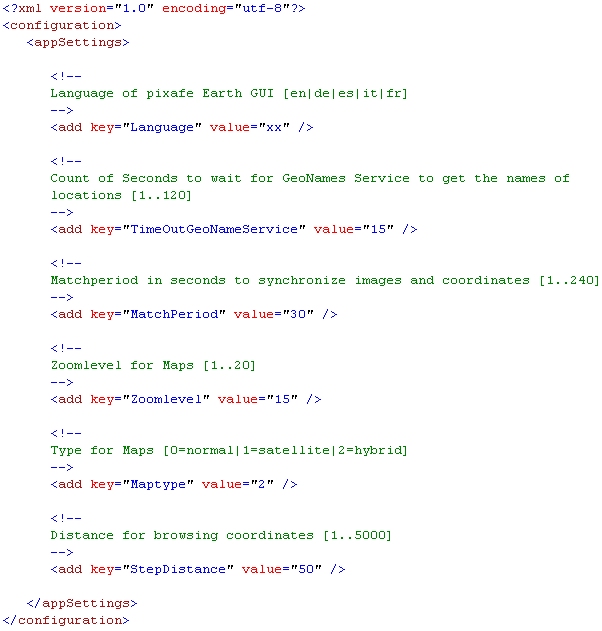
| Setting | Presetting | Possible Values | Description |
| Language | dependent on the language of the operating system | en, de, fr, it, es | With this setting you define the language which is used after the start of the application. en=english, de=german, fr=french, it=itian, es=spanish |
| TimeOutGeoNameService | 15 Seconds | [1..120] | Defines how long the webservice must try to get values to get the name of a location. After the given time span is over an error message is shown. You can define a value from 1 and 120 seconds. |
| MatchPeriod | 30 Sekunden | [1..240] | Defines the time span for matchin images to cooridnates. If you define the time span 10 seconds than images will be matched with all coordinates that are taken 5 second before and 5 seconds after the time of the exact image date. |
| Zoomlevel | 15 | [1..20] | Defines the zoom level of the map view. Value 1 means far away, 20 means close to the location so that you can recognize houses in the hybrid or sattelite view. |
| Maptype | 1 | [0|1|2] | Defines the type of the map: 0=normal map, 1=sattelite view, 2=hybrid view that means a sattelite image combined with names of streets and places. |
| StepDistance | 50 | [1..5000] | The distance for the steps when browsing coordinates. If you have recorded 100 coordinates and you did not move, then all the coordinates show the same location. If you then look at the map browse through the coordinates you can define how far away the next coordinat has to be so that you see another location. |
|